


MPE keyboards send per-note pitch bend, pressure, and slide. Most hardware synths don't fully understand MPE, but some respond to parts of it. Keyboards like the Roli ones offer aftertouch, slide, and release velocity out of the box. The Korg Wavestate and Modwave support Poly Aftertouch and Release Velocity. Two out of three dimensions. That's enough to make a real difference.
In short:
- Poly Aftertouch: Each key sends independent pressure. The Wavestate and Modwave respond to this per note, not just as a global channel message.
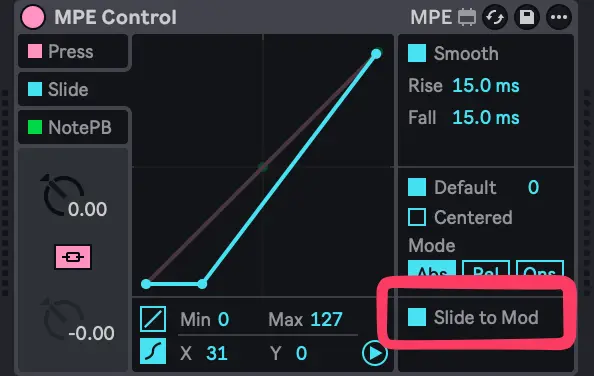
- Slide via CC1: In Ableton, use the MPE Control device to map Slide to the modulation wheel. Now your Y-axis movement reaches the synth.
What your MPE keyboard sends
Five dimensions per note:
- Pitch Bend: per note, independent bend per key
- Pressure (Aftertouch): how hard you press after the initial strike
- Slide: vertical finger movement on the key surface
- Initial Velocity
- Release Velocity
Roli Seaboard keyboards output all five. Their soft silicone keys let you glide, press, and lift with nuance. Other MPE controllers like the LinnStrument and Sensel Morph work the same way.
A non MPE synth ignores per-note pitch bend entirely. But if it responds to Poly Aftertouch and CC1, you still get two expressive dimensions through. Your Roli slides become mod wheel movements. Your finger pressure becomes poly aftertouch. Release velocity passes through as-is.
Setting up MPE Control in Ableton
Add the MPE Control device before your synth. Set Slide to output as CC1 (Modulation Wheel). That's it. Your slide movements now reach any parameter mapped to the mod wheel.
My Wavestate preset packs are designed with this workflow in mind. Check them out here.
Designing presets that respond
The hardware needs to know what to do with the data:
- Map Poly Aftertouch to filter cutoff, vibrato depth, or amp level. This is where the biggest expressiveness gain lives.
- Assign Release Velocity to envelope release time or reverb decay. Faster lift = shorter tail.
- Use CC1 (Mod Wheel) for slow filter sweeps, LFO depth, or wave morphing.
- Keep modulation subtle. Small amounts per voice add up fast. Start at 10–20% depth.
The Modwave works too
The same approach applies. Poly Aftertouch, Release Velocity, CC1. Build your patches the same way and the Modwave becomes just as expressive.
Any synth with Poly Aftertouch
This isn't just about Korg. Any hardware synth that accepts Poly Aftertouch and CC1 can benefit from a Roli Seaboard or other MPE keyboard. Check your synth's MIDI implementation chart. If you see Polyphonic Aftertouch and Mod Wheel listed, you're good to go. Release Velocity is less common but worth checking for too.
Conclusion
You don't need an MPE synth to benefit from an MPE keyboard. Map what the synth can hear. Use Ableton's MPE Control device and design patches that respond. The Wavestate and Modwave already speak enough of the language to feel like different instruments under your fingers.
If you're using MPE with other non MPE hardware, share your setup in the comments 😉

Speak your mind