


Tutorial mode is the comfort zone where you keep watching videos, browsing plugins, and learning techniques, but never actually finish a track. It feels productive, but it's not. The real skill develops when you sit down and make something, even if it's imperfect. Constraints are what unlock creativity, not more options.
In short:
- The 30-Day Template: Create a default Ableton project with only four essential tracks (Drums, Bass, Synth, FX) pre-loaded with your favorite sounds, and force yourself to produce an 8-bar loop every two days.
- Four Tracks Only: Drums, Bass, Synth, FX, each pre-loaded with your go-to sounds. No blank slate paralysis, no decision fatigue. You open the project and you're already halfway there.
- The Constraint: 8-bar loop in under 15 minutes. No new plugins. No tutorial videos. No exceptions. The timer starts when you open the project.
The reason most producers stay stuck in tutorial mode is that every new session starts from zero. A blank project is an infinite canvas, and that's the problem. You spend 45 minutes choosing a kick drum, then another 30 browsing presets, and before you know it the session is over and nothing was written.
The 30-Day Template eliminates that friction by pre-deciding everything that isn't the music itself. Your sounds are loaded. Your tracks are routed. Your template is ready. The only thing left to do is compose.
Here's everything you need to know about setting it up, and more importantly: how to stick with it!
Setting up your 30-Day Template
Open a new Ableton Live project and strip it down to the essentials:
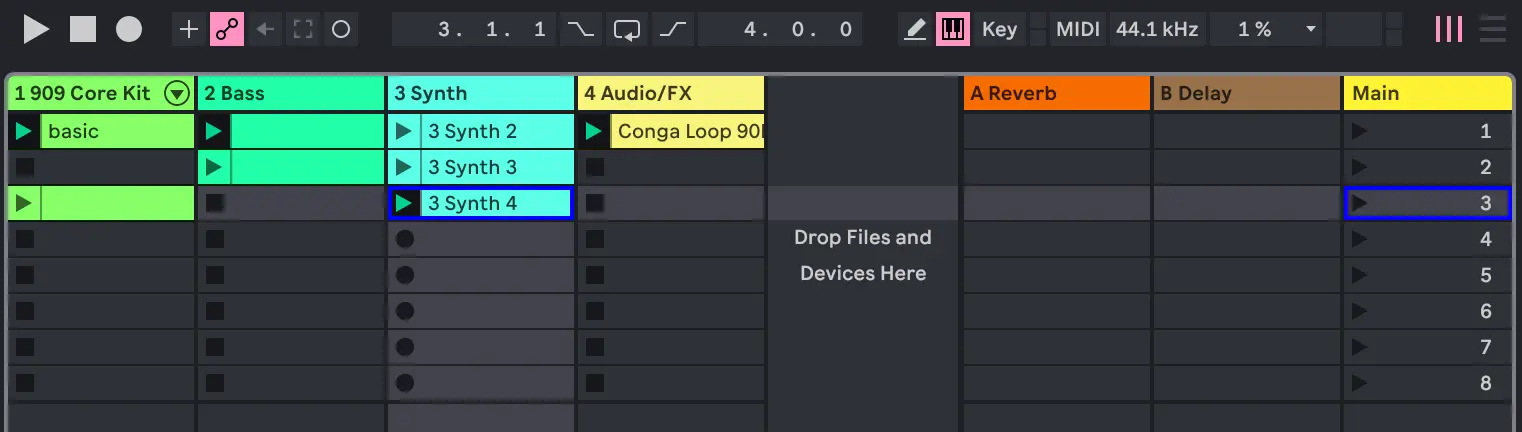
- Drums track: Load your go-to drum rack with the kicks, snares, hi-hats and percussion you reach for every time. If you always use the same 808 kit, put it there.
- Bass track: Insert your favorite bass synth or sampler patch. One sound. Not ten alternatives — one.
- Synth track: Same principle. Pick the pad or lead you know best. It doesn't have to be the "perfect" sound, it has to be the sound you're comfortable with.
- FX track: Add an audio track FX samples, percussions loops, or vocals.
Save this project as your default template: User Library > Templates, or go to Preferences > File/Folder > Save Current Set as Default.
The goal is that when you open Ableton, you see four tracks ready to go and you start writing immediately.
The rules of the exercise
Discipline is the point. Without rules, you'll drift back into browsing and watching. Here are the rules:
- Open the template every two days. Not "when inspiration strikes." Not "after work if I feel like it." Every two days. Set a reminder.
- 15 minute timer. Start it the moment the project opens. When it rings, export what you have, even if it's rough.
- 8-bar loop only. You're not writing a full song. You're writing one loop. That's it. The loop is the atom of electronic music, master the loop and everything else follows.
- No new plugins. You use what's in the template. If a sound isn't working, change the notes, not the patch.
- No tutorial videos. If you don't know how to do something, do it wrong. You'll learn more from a bad decision than from watching someone else make a good one.
- No PC? No excuse. Use Ableton Note on your phone or tablet to sketch that 8-bar loop anywhere, on the couch, on the train, at a café. The 4-track constraint (Drums, Bass, Synth, FX) maps perfectly to Note's workflow. Export your Set to Ableton Live later and refine the sounds with your full setup. The point is to compose, not to wait until you're at your desk.
What happens after 30 days
If you follow the rules for a month, you'll have roughly 15 loops on your hard drive. Some will be garbage. A few will be genuinely good. One or two might become actual tracks.
But the real result isn't the loops. It's what happened while making them. You've built muscle memory for starting. You've broken the perfectionism loop. You've trained your brain to go from "open project" to "something playing" in under five minutes. That's a skill no tutorial can teach you.
After 30 days, the template isn't a constraint anymore it's a launchpad. You'll naturally start expanding it, adding tracks, swapping sounds. But you'll do it from a place of confidence, not from the paralysis of a blank project.
Conclusion
Tutorial mode feels safe because there's no risk of failure. But there's also no chance of success. The 30-Day Template is a deliberate constraint: four tracks, 15 minutes, no distractions. It's not about making perfect music. It's about making any music, consistently, until the act of starting becomes automatic.
If you try the 30-Day Template, share your results in the comments 😉
⭐ Not sure where to focus? Test your Ableton level in 5 min.


Speak your mind